Software

日本語(Japanese)


1. SkyKakapo Browser

Last updated: August 18, 2026

1.1. Features

SkyKakapo is an independent web browser developed by Tete based on the Firefox open source project.

This software is provided "as is", without warranty of any kind. The developer shall not be liable for any damages arising from its use.

It is not affiliated with the Mozilla Foundation or Mozilla Corporation. Firefox is a trademark of the Mozilla Foundation.

1.2. Download

SkyKakapo 154.0

Last updated: August 18, 2026
x64 SSE3

SkyKakapo 154.0 [2026081721 en-US win64 sse3 cspgo] (91.6MB)

  • MD5: 285e6a28de35f745310c3b1e4384e16f
  • SHA1: a144601750f4b584b37814803dcbd3d623badee1
  • SHA256: 577e6803d1fc29f121f2c684638d7aa88c76b3bbda7871f94053aefa6d8cd1ed

1.3. Migrating from Firefox Private Builds to SkyKakapo

Last updated: August 8, 2026

Migration Background

I have been publishing builds based on Firefox source code with my own modifications as Firefox Private Builds since Firefox was first released.

However, according to the Mozilla Trademark Guidelines, independent projects that use Mozilla's open source code are required to use their own branding.

Therefore, I will discontinue publishing Firefox Private Builds and publish SkyKakapo, a browser with its own branding, as the successor to Firefox Private Builds.

How to Migrate Profiles

By default, Firefox Private Builds and SkyKakapo use different locations for storing profile folders. Therefore, a profile used with Firefox Private Builds cannot be used directly with SkyKakapo in the usual way.

Using SkyKakapo's profile import feature, you can copy an existing profile folder to SkyKakapo's profile folder location and register it as a SkyKakapo profile. The next section explains Firefox Private Build Profile Folder Locations.

I apologize for any inconvenience caused by the migration process, and I appreciate your understanding.

Firefox Private Build Profile Folder Locations

Default:

If you are using the same profile folder as the official Firefox, individual profile folders are stored in the following folder.

%APPDATA%\Mozilla\Firefox\Profiles

When using portable mode:

If Portable=1 is specified in the [General] section of the tmemutil.ini file, individual profile folders are stored in the following folder.

(PortableDataPath)\AppData\Mozilla\Firefox\Profiles

When the profile folder path is specified using the -profile startup switch or the XRE_PROFILE_PATH environment variable:

The specified path is the profile folder path.

To easily find the profile folder of the currently running Firefox Private Build, open "Help" - "More Troubleshooting Information" and check the "Profile Folder" item under "Application Basics".

1.4. Unique Features

Last updated: August 18, 2026

Profile Import Feature

You can copy an existing profile folder to SkyKakapo's profile folder location and register it as a SkyKakapo profile.

If the menu bar is not displayed, press the Alt key to show it.

Select "Import Profile..." from the File menu and specify the profile folder you want to import. The "Import Profile" dialog will open, allowing you to choose between two profile registration methods: "Classic" and "Profiles menu".
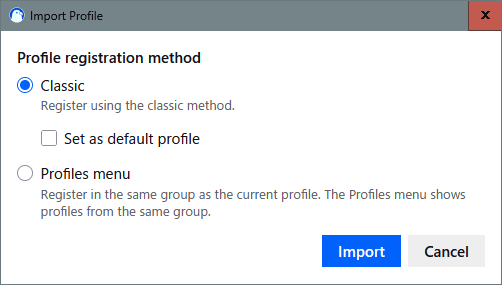
Import Profile dialog

  • "Classic" is the classic profile registration method. It may be helpful to think of it as the same type of profile registration used in about:profiles or in the Profile Manager opened with the -p startup switch. See "Profile Manager - Create, remove or switch Firefox profiles".

  • "Profiles menu" is a relatively new profile registration method. It registers the profile in the same profile group as the current profile. Only profiles belonging to the same group as the current profile are displayed in the Profiles menu and other new profile management UIs. See "Manage Firefox profiles".
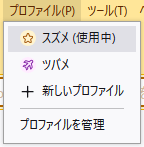
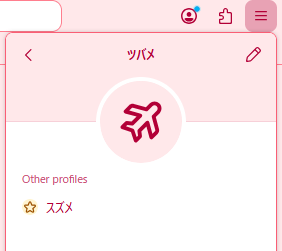
    Profiles menu Application menu

Importing may fail if the full path of a file or folder within the profile is too long. For more information, see the explanation of import failures caused by long paths.

Menus Settings Page

Includes the Menus settings page (about:preferences#menus) in Settings. You can hide unwanted items from some of the major menus.
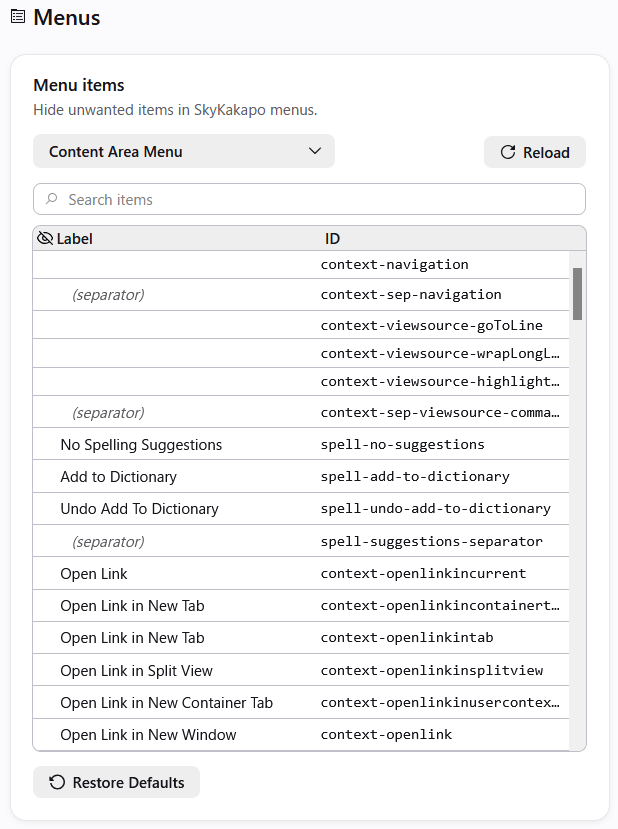
Menus settings page

1.5. How to Update (My Way)

Last updated: August 18, 2026
  1. Extract the SkyKakapo 7z file to a folder of your choice using an archive utility such as 7-Zip. On Windows 11 and later, you can also extract 7z files directly in File Explorer.
  2. Go to the folder where the previous version of SkyKakapo is installed. If necessary, back up the following file and folder to another location:
    • the tmemutil.ini file (if present)
    • the folder specified by PortableDataPath (if portable mode is enabled)
  3. Delete the old build.
  4. If necessary, copy the files and folders that you backed up to another location to the new build.
  5. You can change the language by going to [Tools] - [Settings] - [Languages] and selecting a language under [Browser language].

1.6. Gallery

Last updated: August 6, 2026

SkyKakapo logo

Those lovely round eyes...


3. SkyKakapo-Specific DLLs

Last updated: August 18, 2026

3.1. Release DLL

Last updated: October 4, 2023

Release DLLs specifically for SkyKakapo.

Memory Utility

Fixed a bug that may cause portabilization to fail.

x64
tmemutil-20231004-x64.7z (58KB)
  • MD5: 3c0a9c88329dd1afb4b599f39af2e463
  • SHA1: 091077bf3360a8cd085ddfb6ffafaa6be8b5a482
  • SHA256: 87acdc00f6b22f90efbc9f0f84063187ee8222fcc953d695672874fef745f974

3.2. Beta DLL

Last updated: April 27, 2014

At present, there is no beta DLL.

3.3. Test DLL

Last updated: August 18, 2026

These are DLLs for SkyKakapo, but they are intended to test whether the Release DLL or Beta DLL have any issues. Most functions use the Microsoft C Runtime code as-is.

If using the DLL below resolves the problem, this indicates that there may be a bug in the older DLL. In that case, I would appreciate it if you could let me know the version number of the DLL that caused the problem.

Memory Utility

x64
tmemutil-20130315-x64-test.zip (6KB)
  • MD5: 396c86c030bf32a802017be0136a20f5
  • SHA1: 30d8579211127c301ef2053567633aebef61d607
  • SHA256: 5a19da013c3a6fc733cd330fb27cb49d029c09fa121eb42e323bd905c6306619

4. SkyKakapo FAQ

4.1. Troubleshooting SkyKakapo

Last updated: August 18, 2026

I can't run SkyKakapo. Or, C Run-Time Error R6034 occurs.

If you install SkyKakapo over another build, files from the old and new builds may be mixed together, which can cause problems. In that case, install SkyKakapo in a new folder.

Using the profile import feature may fail with NS_ERROR_FILE_NAME_TOO_LONG or NS_ERROR_FILE_NOT_FOUND.

SkyKakapo's profile import feature uses Mozilla's standard I/O functionality to copy profiles. Windows has limitations on the use of long paths, and Firefox's source code does not fully support long paths, so importing a profile containing files or folders with long full paths may fail.

In that case, move the profile folder you want to import to a shorter path and try again. Using a shorter path for SkyKakapo's profile storage location may also improve the situation.

When Hyper-Threading technology is enabled, deadlocks do happen occasionally in a short amount of time.

When you open tmemutil.ini and set the value of ProcessAffinityMask to 1 or 2, SkyKakapo uses only a single logical CPU, so the symptom may improve.

I tried the above, but a problem still occurs in SkyKakapo.

Please try the following.

  • Try troubleshooting.
  • Check whether the same issue can be reproduced with the same version of Firefox.
  • Try test DLL.

After trying the above, if you suspect that the issue may be a bug in SkyKakapo, I would appreciate it if you could let me know on the forum or elsewhere. In that case, providing the following information may help narrow down the cause of the problem.

  • A description of the problem and how to reproduce it.
  • The SkyKakapo version.
  • The enabled add-ons (extensions, themes, and plugins).
  • The name of the operating system and CPU.

4.2. About tmemutil.ini

Last updated: August 18, 2026

The tmemutil.ini file is the initialization file for SkyKakapo. If the tmemutil.ini file exists in the root folder of the SkyKakapo, initialization settings are read from it.

Lines whose first character is ; (semicolon) are treated as comment lines. The contents of comment lines are not read as initialization settings.

[General] Section

Portable

Enable or disable portable mode. If this value is 0, portable mode is disabled (default). If the value is 1, portable mode is enabled.

If you enable portable mode, the paths of the application data folder (%APPDATA%) and the local application data folder (%LOCALAPPDATA%) are redirected to the AppData and LocalAppData subfolders under the folder specified by the PortableDataPath setting. This means data such as profiles is saved within the folder specified by the PortableDataPath.

To use SkyKakapo in portable mode, it is also recommended to set the environment variable MOZ_LEGACY_PROFILES=1. You can also write this environment variable in the [Env] section of the tmemutil.ini file.

PortableDataPath

Specifies the location where portable data is saved when portable mode is enabled. The default value is PortableData.

A relative path can be specified. The relative path is based on the root folder of the SkyKakapo. If an error occurs while resolving the path, the default value (PortableData) is used.

CreateCrashDump

Specifies whether a crash dump file is created when an unhandled exception occurs. The default value is 0 (disabled). Set this value to 1 to enable it.

If the SkyKakapo crashes, it would be helpful if you could enable this option, create a crash dump file, attach it to an email, and send it to me. This makes it easier to identify the cause of the problem.

If the SkyKakapo is stable, please disable this option.

CrashDumpType

Specifies the type of crash dump file. Specify a combination of MINIDUMP_TYPE values as a decimal number or a hexadecimal number (with the 0x prefix). The default value is 0 (MiniDumpNormal).

ProcessAffinityMask

Specifies the affinity mask for threads in the SkyKakapo. This value is a bit vector. The default value is 0, which leaves affinity management to Windows. Please refer to SetProcessAffinityMask.

[Env] Section

You can specify environment variables. The following are some examples.

MOZ_LEGACY_PROFILES=1

Disables the feature introduced in Firefox 67 that uses a dedicated profile for each browser installation. If this environment variable is not set, starting the browser after moving it to another path may result in a new profile being created and used.

MOZ_ALLOW_DOWNGRADE=1

Disables the feature introduced in Firefox 67 that prevents a profile used by a newer version of the browser from being used by an older version. Using the same profile between different versions may cause the profile to become corrupted.

TT_DISABLE_PRIVATE_BROWSING_SHORTCUT_CREATION=1

Prevents the shortcut file for Private Browsing from being created in the Start menu. If this shortcut file does not exist in the Start menu, attempting to pin a Private Window to the taskbar will pin a regular window instead. See Bug 1762994.

XRE_PROFILE_PATH=Absolute path of the profile folder

Specifies the path to the profile folder. If you also specify XRE_PROFILE_LOCAL_PATH, you can specify a separate profile local folder for storing removable data such as caches (maybe).

XRE_PROFILE_LOCAL_PATH=Absolute path of the profile local folder

Specifies the path to the profile local folder corresponding to the profile folder specified by XRE_PROFILE_PATH. Removable data such as caches is stored there. If this environment variable is not specified, such data is also stored in the profile folder (maybe).


5. Others

5.1. XML Parser for Maruo Editor

Last updated: September 12, 2010

This is a macro of the 32-bit Maruo editor (秀丸エディタ) to parse whether the current document is a XML document. This macro uses MSXML for parsing documents.

XML Parser for Maruo Editor version 1.11 (Zip archive, 22KB)

  • MD5: ab8284ef9d45508d81200f0006211b42
  • SHA1: a7f91302d1920e15c6206b02026945bb92f8984f
Requirements:

5.2. NEF Thumbnail Extension for Windows 2000

Last updated: April 19, 2009

This is a shell extension, which permits Explorer to display the thumbnail images of Nikon's NEF files. Use at your own risk!

NEF Thumbnail Extension version 1.00 for Windows 2000 (Zip archive, 45KB)

  • MD5: 45EA546E12A8893B5833E1A1BE314AE9
  • SHA1: 93203B37F79713E26D3218D4A4A709F59A32CD07

5.3. PSAPI wrapper for PicLens on Windows 2000

Last updated: June 26, 2008

This DLL makes PicLens usable on Windows 2000. I confirmed this DLL worked well with Firefox.

PSAPI wrapper for PicLens on Windows 2000 version 1.00 (Zip archive, 1KB)

  • MD5: AE88186A751493067CE73328E27BE405
  • SHA1: 28BB93D26627CB5930F4A75860C383535D3CB69F

Usage:

  1. Put PSAPI.dll in the folder that contains web browser's executable file (example: firefox.exe).
  2. Install PicLens.
  3. Run web browser.

If PicLens doesn't work, please disable it once and restart web browser. Run web browser again and enable PicLens.

5.4. Program Icon Changer (for Firefox & Thunderbird)

Last updated: April 30, 2012

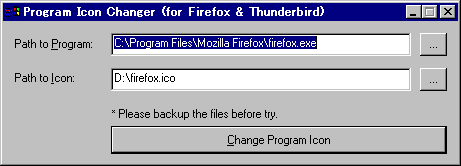
This is a program icon changer (for Firefox or Thunderbird). I often hear the program icons of unofficial builds are not cool, so I made this changer. This changer may have a few bugs, so please create a backup copy of a target program before trying it.

Program Icon Changer (for Firefox? & Thunderbird?) version 0.04 (ZIParchive, 5KB)
  • MD5: c2b5528039656cb67152264385269354
  • SHA1: 25eb5b4748d517c814062afd3d4447b62efb7fdb
Requirements: Windows 2000 or later (Intel x86).

Image of Program Icon Changer